28 thg 5, 2012

Rocky Racoon 5.1.1 Untether updated with support for iPhone 4 (GSM) 5.1.1/9B208 build

Mô_tả


The Rocky Racoon 5.1.1 Untether was just updated to version 1.0-2, and is now available for download in Cydia. This is the package that is installed on iOS devices that utilize the 5.1.1 untethered jailbreak, whether you obtained it via Absinthe, or via the Rocky Racoon installation on a 5.1.1 tethered jailbreak.
This update brings support to the iPhone 4 (GSM) 5.1.1/9B208 build that was recently released by Apple.
All that this means is that you can now gain untethered status using the latest version of Rocky Racoon. If your iPhone 4 is running this firmware build, and it is currently jailbroken using a tethered jailbreak, you can install Rocky Racoon to gain untethered status.
Special thanks to iH8sn0w for the clarification:


Sebastien Page @SebastienPage
Rocky Racoon 5.1.1 Untether updated to version 1.0-2 j.mp/KlBMtl
@SebastienPage It just adds the 5.1.1/9B208 iPhone 4 (GSM) untether payload. :)

Even if you don’t fit the criteria to benefit from the update, it is still advisable that you update in order to be on the absolute latest build of Rocky Racoon. Have you updated yet?

idownloadblog.

Absinthe 2.0 proves jailbreaking is as popular as ever


If you were wondering whether or not people were still wildly interested in jailbreaking, then wonder no more. The Chronic Dev team, the folks behind the Absinthe 2.0 jailbreak tool for iOS 5.1.1, have stated via twitter that its tool has been used to jailbreak over a million devices since it was released on Friday morning.
Unsurprisingly, those numbers look to be a tad higher this time around when compared to the release of the original Absinthe tool back in January.
Obviously the comparisons aren’t exactly scientific, but I think it’s safe to say that jailbreaking has maintained and/or increased its popularity since earlier this year…


"Chronic-Dev, LLC @chronicdevteam
Some stats since release of - 211,401 jailbroken iPad3's and 973,086 devices newly jailbroken! ! ;D"


Was your iOS device included in those numbers? How has your overall experience with this jailbreak been? Let us know all of your thoughts in the comments below.

Sn0wBreeze 2.9.5 brings support for iPhone 4 on 5.1.1 build 9B208

Mô_tả

iOS hacker iH8sn0w has released an update to his popular Sn0wBreeze jailbreak tool for Windows. Hot off the heels of version 2.9.4 comes version 2.9.5. This latest update brings supports for the iPhone 4 5.1.1 build 9B208 that Apple stealthily released on Friday.
Sn0wBreeze 2.9.5 also includes a fix for the iPhone 3GS (iPad Baseband users) location services. Check inside for the download links to this staple jailbreak tool for Windows…
Again, it’s worth mentioning that Sn0wBreeze supports A4 devices and below only. A5 devices are not yet supported, as brought out in our previous post. If you need to jailbreak an iPad 2, iPhone 4S, or the new iPad, it’s best to stick with the Absinthe jailbreak tool.

Download: http://mirror.devkipz.us/sn0wbreeze-v2.9.5.zip

idownloadblog.

25 thg 5, 2012

Absinthe 2.0.2 brings support for iPhone 4 on 5.1.1 build 9B208

The a Chronic Dev Team just released an update to Absinthe, bringing the jailbreak utility to version 2.0.2.
There isn’t anything new in Absinthe 2.0.2 besides support for the iPhone 4 GSM iOS 5.1.1 firmware update (build 9B208) that Apple recently released
Absinthe is compatible with most recent iOS devices running iOS 5.1.1, including the new iPad (iPad 3), the iPhone 4S, the iPad 2, the iPhone 4, iPod touch 4th generation, iPhone 3GS, etc. Note that iPad 2,4 support will be added later.

Download

Mac: https://sites.google.com/site/greenpois0nabsinthe/absinthe-mac-2.0.2.dmg?attredirects=0&d=1

Win: https://sites.google.com/site/greenpois0nabsinthe/absinthe-win-2.0.2.zip?attredirects=0&d=1

Linux: https://sites.google.com/site/greenpois0nabsinthe/absinthe-linux-2.0.2.tar.bz2?attredirects=0&d=1

Sn0wBreeze 2.9.4 released with iOS 5.1.1 jailbreak support [updated]


Just a few minutes ago, iH8sn0w released Sn0wBreeze 2.9.4 with iOS 5.1.1 untether support in tow. Along with the new jailbreak support, there are a few other notable changes worth pointing out as well.
Sn0wBreeze 2.9.4 supports all devices (below A5) that are capable of running iOS 5.1.1. This excludes the A5(X) powered iPad 3, iPhone 4S, iPad 2, along with the Apple TV 3 — which is currently not jailbreakable with any tool.
Check inside for a full rundown on what you can expect from this Windows-based jailbreak staple, along with the download link…
We should also note that Sn0wBreeze 2.9.4 doesn’t support the recently released 5.1.1/9B208 update for the iPhone 4 GSM.
If you want to jailbreak the iPad 3, iPad 2, or iPhone 4S, iH8sn0w suggests that you stick with the Absinthe tool from the Chronic Dev Team.
Here are the full list of release notes for Sn0wBreeze 2.9.4:
iPhone 4 (GSM) & Apple’s 5.1.1/9B208 Update:
This evening, Apple appears to have (surprisingly) released 5.1.1/9B208 for the iPhone 4 (GSM) exclusively. Although there isn’t much of a difference it was enough to make the 9B206 untether payload for the iPhone 4 (GSM) invalidate on 9B208. Until pod2g/planetbeing build an untether payload for this build, 9B208 support is not included. A small update will be pushed whenever this occurs. This doesn’t mean the untether was patched though.
A5(X) Support?:
As stated many times in the past, sn0wbreeze cannot be updated to work on A5(X) devices until a low level exploit in DFU or iBoot is found and made public. Therefore, A5(X) users will have to rely on using the lovely absinthe.
A5(X) Baseband Preservation/Hacktivation?
For those running A5(X) devices and need to preserve your baseband, there is nothing you can do at the moment. For those wanting to hacktivate, the only advice I can give is to buy the carrier’s SIM (the one its locked to obviously) on ebay. The SIM does not have to be active with the carrier to activate the phone.
Download: http://mirror.devkipz.us/sn0wbreeze-v2.9.5.zip

idownloadblog.

Absinthe 2.0 released - jailbreak iOS 5.1.1


Download Absinthe 2.0

Hổ trợ:

iPhone 3Gs
iPhone 4
iPhone 4 CDMA
iPhone 4S
iPad 1
iPad 2 Wifi
iPad 2 GSM
iPad 2 CDMA
iPad 3 Wifi
iPad 3 CDMA
iPad 3 Global
iPod 3G
iPod 4G
AppleTV 2

Mac:
https://sites.google.com/site/greenpois0nabsinthe/absinthe-mac-2.0.dmg?attredirects=0&d=1

Win:
https://sites.google.com/site/greenpois0nabsinthe/absinthe-win-2.0.zip?attredirects=0&d=1

Linux:
https://sites.google.com/site/greenpois0nabsinthe/absinthe-linux-2.0.tar.bz2?attredirects=0&d=1

Kích hoạt icon Absinthe sẽ tự extract 1 folder có chứa file absinthe.exe. Open him để jailbreak!!!


Kết nối thiết bị click jailbreak. Absinthe sẽ bắt đầu quá trình jailbreak!

My iPad


 Khi hoàn tất Cydia sẽ xuất hiện trên springboard.Enjoy!!!


Thiết bị nào A4 trở xuống đã tethered 5.1.1 - redsnow không phải jailbreak lại chỉ cần open Cydia search và install "Rocky Racoon 5.1.1 Untether" sẽ dc Unthethered jailbreak (watch tutorial video). Have fun!!!


21 thg 5, 2012

Absinthe 2.0 iOS 5.1.1 untethered jailbreak in action [Video]


(iDownloadblog) - Shortly after confirming the name of the upcoming iOS 5.1.1 jailbreak tool, iOS hacker, xvolks, uploaded a video showcasing Absinthe 2.0 in action.
xvolks warns that the video is poor quality, but given that he and the rest of the team have been working very hard on getting this release out as soon as possible, we can surely cut him some slack.
The video is of an iPhone 4 GSM running iOS 5.1.1. The iPhone 4 is jailbroken with the new Absinthe tool, which incorporates pod2g’s exploits.
Check inside for a sneak peak at the new Absinthe 2.0 in action...

It looks like one of the main tasks left on the plate is for the team to test the remainder of the eligible devices with Absinthe 2.0. Seeing that the device list is quite large, this could take a few days in itself.

19 thg 5, 2012

Upcoming jailbreak tweak makes notifications more verbose

(iDownloadblog.com) -  iOS 5′s upgraded notification system was a welcomed addition to iOS’ repertoire, but as time goes on it’s evident that it can be improved even more so.
Developers Joshua Tucker and Conrad Kramer have taken matters into their own hands to improve iOS notifications. The result is a tweak that allows you to view the full body of your notifications from the Lock screen or via banner notifications.
Take a look at the preview video for Reveal inside…
  
With Reveal installed, banner notifications are more verbose by means of a horizontal marquee scroll, which enables you to scroll through the body of the entire message.
Lock screen Notifications received attention as well; now you can scroll vertically to view an entire message, or tap the Lock screen notification to fully expand the table cell.
Reveal has been submitted to Cydia, and will be available within the next 24 hours for $1.99.
What do you think?

18 thg 5, 2012

Pod2g Finds Way to Untether iOS 5.1.1 Jailbreak for iPhone 3GS, iPod Touch 3G

(iClarified) - Pod2g has announced the discovery of a way to untether the iOS 5.1.1 jailbreak for the iPhone 3GS and iPod Touch 3G.

Previously, pod2g had thought these devices would not be compatible with the untether.

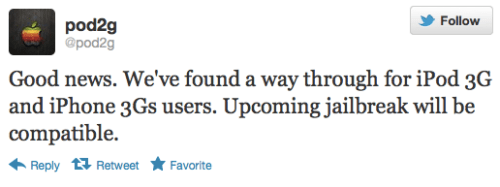
Good news. We've found a way through for iPod 3G and iPhone 3GS users. Upcoming jailbreak will be compatible.

Here is the list of devices that are known to work for sure:
 iPhone 4
 iPhone 4S
 iPad 1
 iPad 2 Wifi
 iPad 3 Wifi
 iPad 3 CDMA
● iPod 3G
● iPod 4G

Here is the list of devices that won't be supported:
● AppleTV 3

Remains to test (but that should work):
● iPhone 3Gs
● iPad 2 GSM
● iPad 2 CDMA
● iPad 2 Wifi, R2
● iPad 3 Global
● AppleTV 2

You can follow iClarified on Twitter, Facebook, or RSS to be notified of any updates.

Waterproof iPhone Skin is Just 0.25mm Thick [Video]

 Idownload.com

(iClarufied) - Check out this waterproof skin for the iPhone by Gooma dubbed the Case Marine.

"This is the Case Marine. Until now, waterproof cases for smartphones haven't looked very good, as they've all been bulky. But we've developed a stylish, attractive case. It's made of 0.25mm polyurethane with a special finish. The screen part is made of acrylic. It can be used for an iPhone or a Galaxy S2. With a bit of practice, this case can be put on in about 5 seconds. When it's attached, there's a bit of slack at the back. Even if the phone is placed in water, the case makes it waterproof to everyday standards. The seal on the back has been certified by Oki Engineering; it has a JIS rating of IPX8, which is the highest level in Japan. So it keeps your smartphone waterproof down to a depth of 10m."

The company's current lineup fits the iPhone 4S and Galaxy S2. They also plan to release an iPad case in the future.

The Premium versions are priced at 3,000 yen ($37), and the Lite ones at 1,200 yen ($15(). The iPad case will be available for about 4,000 yen ($50).

iPhone | How to Jailbreak Your iPhone 4 Using RedSn0w (Windows) [5.1.1]

(iclarified.com) - These are instructions on how to jailbreak your iPhone 4 on the 5.1.1 firmware using RedSn0w for Windows. The Mac version of this tutorial is here.

Upgrading your iPhone to iOS 5.1.1 through iTunes will update your baseband, potential removing or ruining your chances for an unlock. Please follow this tutorial on how to update to iOS 5.1.1 using a custom ipsw if you need an unlock. The jailbreak is also tethered which means you will need to connect your device to the computer each time you reboot. Finally, it may be prudent to save your SHSH Blobs by following this tutorial before continuing.

If you want to jailbreak a lower firmware version you can find the appropriate tutorial here. If you are on iOS 5.1 and want to stay on that firmware you can still use these instructions by performing the same steps with the iOS 5.1 firmware.

Step One
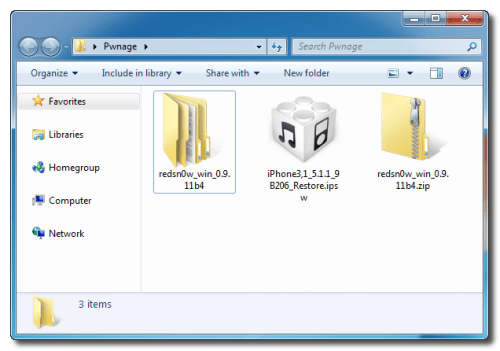
Create a folder on your desktop called Pwnage

Download the latest version of RedSn0w from here and place it in the Pwnage folder. Likewise, download the 5.1.1 firmware from here and place it in the Pwnage folder. (Note: you do not need to download the 5.1.1 firmware if you are already on iOS 5.1.1)

Extract the RedSn0w zip file by double clicking it.


 Step Two: (You can skip this step if iOS 5.1.1 is already installed on your device)
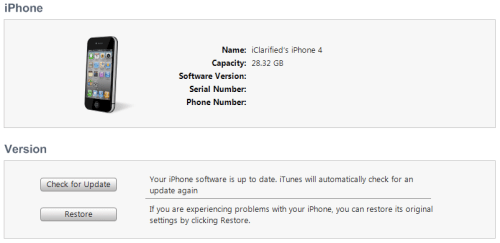
Connect your iPhone to the computer and launch iTunes.

Select your iPhone from the list of devices on the left. Now hold down Shift and click the Restorebutton. Restore is preferred as it won't create any wasted space on your iPhone.


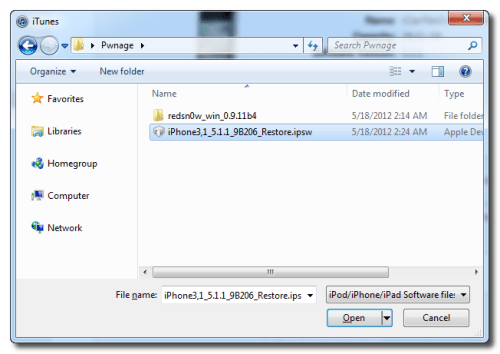
Navigate to the Pwnage folder on your desktop and select the 5.1.1 firmware ipsw. Click the Choose button to continue. 

iTunes will now update your iPhone to the new firmware.

Step Three
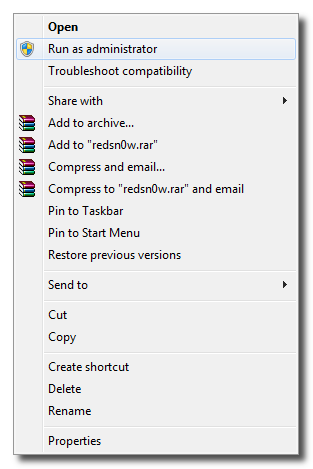
Launch the redsn0w application from the redsn0w folder we extracted earlier. You can do this by right clicking the executable and selecting Run as Administrator contextual menu.


Step Four
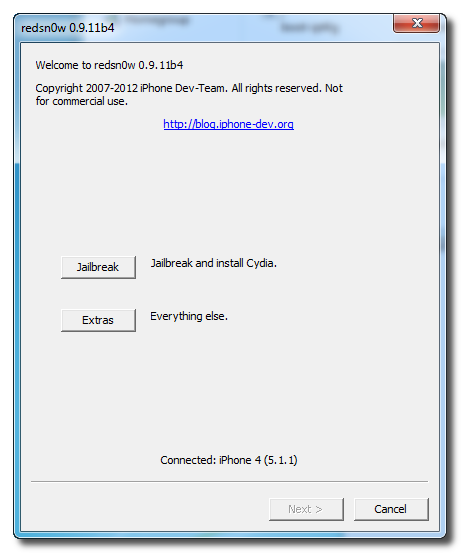
Once RedSn0w opens click the Jailbreak button


Step Five
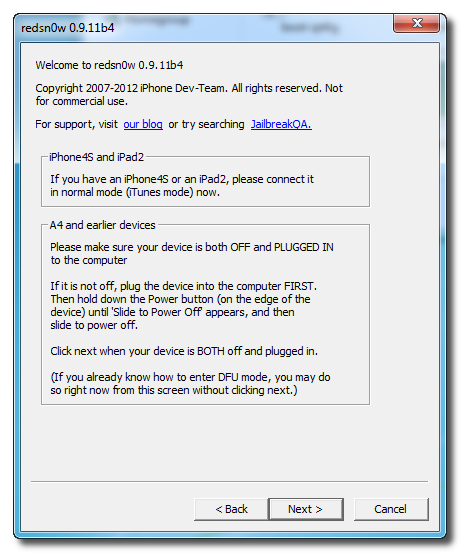
Plug your iPhone into the computer and make sure its OFF then click the Next button

Step Six
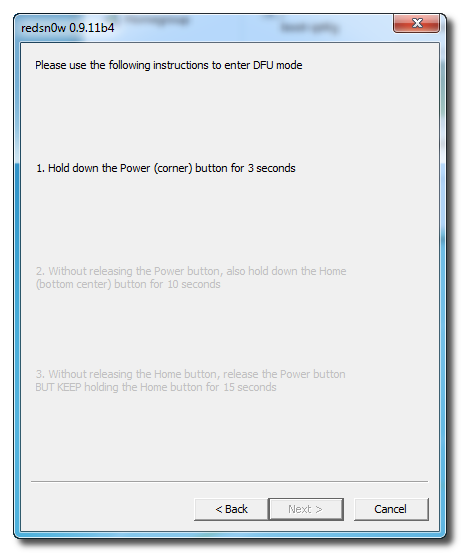
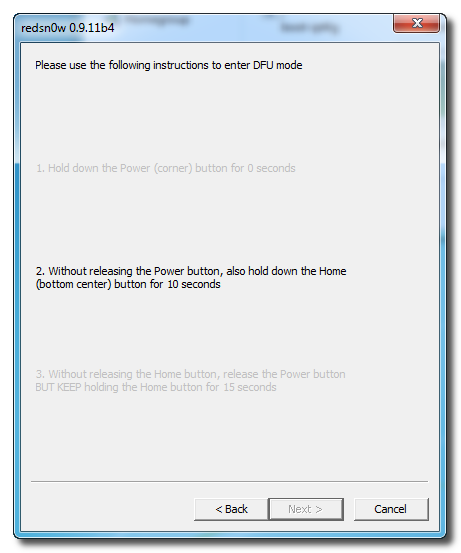
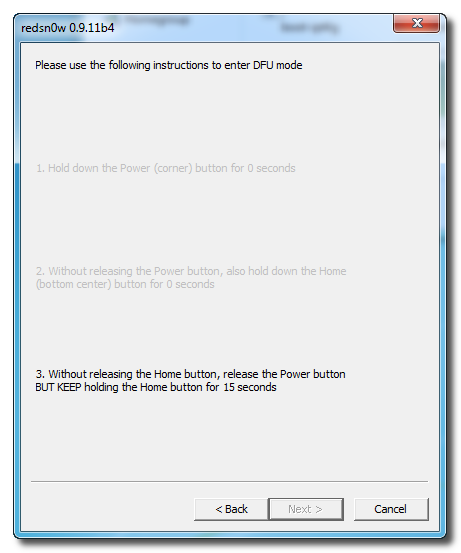
RedSn0w will now guide you through the steps to get into DFU mode. You can find more help with DFU mode here

Hold down both the Home button and the Power button for 10 seconds.

 Release the Power button and continue holding the Home button until RedSn0w detects the device.

Step Seven
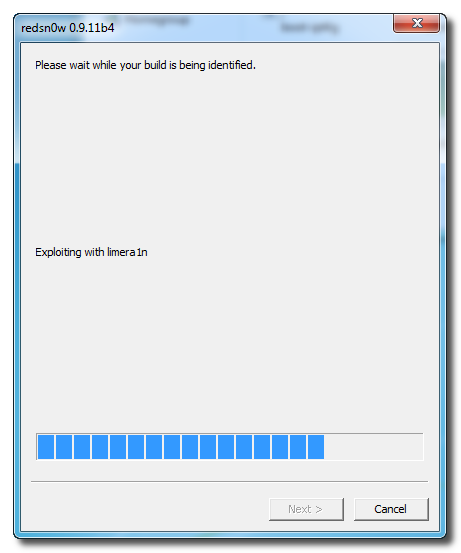
Your iPhone will now be exploited with limera1n and reboot

Step Eight
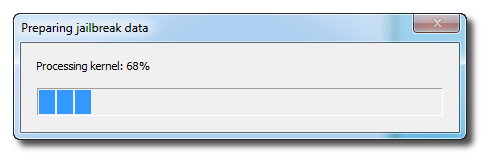
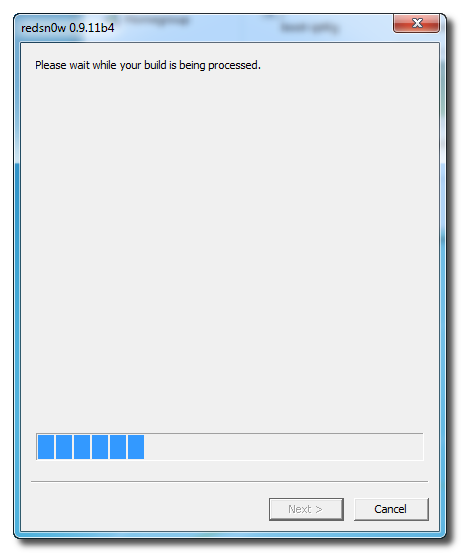
RedSn0w will now prepare the jailbreak data.

 Step Nine
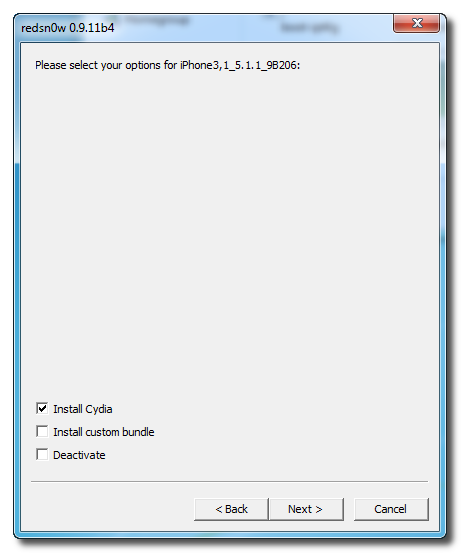
Select Cydia from the list of options and click Next.

 Step Ten
Your iPhone will now be rebooted again and RedSn0w will begin uploading the new RAM Disk and Kernel. 


Step Eleven
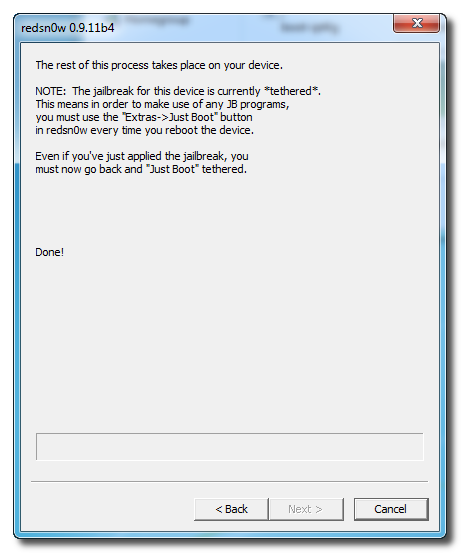
Once this is complete you will be notified that RedSn0w is done. When your iPhone finishes rebooting (5 minutes or so) it will be jailbroken with Cydia on the SpringBoard.


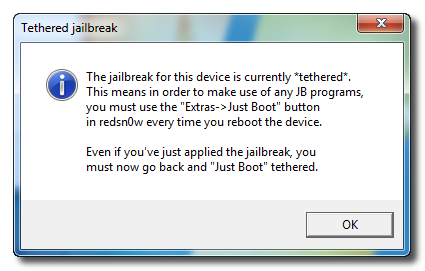
 BOOT TETHERED
Once you have jailbroken you will need to rerun redsn0w to boot tethered.

Step One
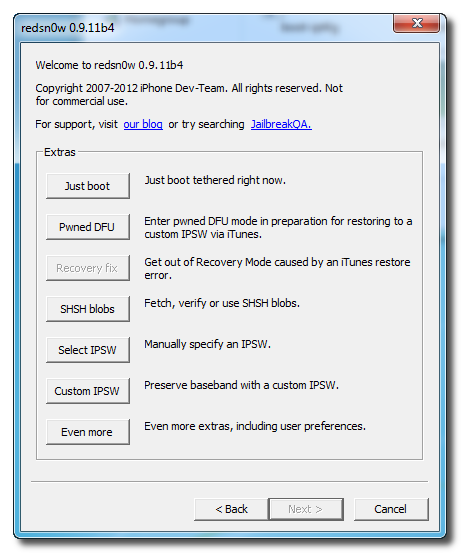
From the main RedSn0w menu click the Extras button.

 Step Two
Select Just boot from the Extras menu to just boot tethered.


*As usual a big thanks to the iPhone Dev-Team and Geohot for their hard work and contribution to the iPhone community.


17 thg 5, 2012

These two tweaks make it easier to delete contacts and history items


(iDownloadblog.com) - For some strange reason Apple has made deleting contacts an overly difficult task; they’ve likewise made deleting individual Safari history items impossible.
Perhaps these hurdles and restrictions exists by design, but that doesn’t change the fact that they’re both incredibly annoying.
If you happen to be jailbroken, two tweaks — OneByOne Safari and OneByOne Contacts — seek to address this lingering issue within iOS. Full video walkthrough inside…

Each tweak is fairly self explanatory. OneByOne Contacts allows you to easily delete contacts “one by one” from the main contacts screen. OneByOne Safari allows you to easily delete individual history items.
Neither tweak will knock your socks off, but as Sebastien pointed out to me earlier, both are very useful for managing history and contacts.
If you’re interested in trying either tweak, head over to Cydia’s BigBoss repo where you can download both for free.
What do you think? Are these tweaks solving real issues within iOS, or is this an overblown problem?

Breaking

 
Copyright © 2013 Blog Tập Sự :D